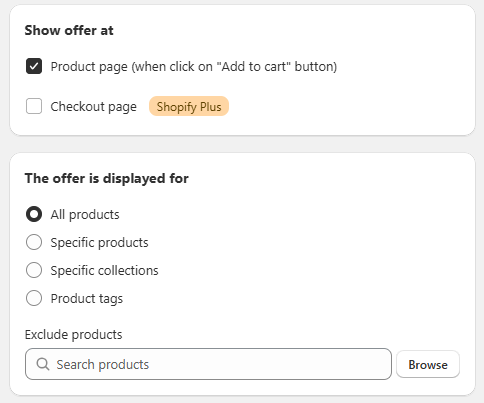
General Settings Sección: Show offer at - The offer is displayed for
Apr 10, 2026
This section allows you to define where the offer will be displayed and which products the bundle will apply to within the store.
Show offer at
In this block, you configure where the offer will be displayed:
Product page:
Displays the bundle on the product page, typically when interacting with the “Add to cart” button.
Checkout page (Shopify Plus):
Allows the offer to be shown during the checkout process.
⚠️ Available only for stores using Shopify Plus.
The offer is displayed for
This section defines the scope of the promotion within the catalog:
- All products: Applies the bundle to all products in the store.
- Specific products: Allows selecting specific products where the offer will be displayed.
- Specific collections: Applies the promotion to products within selected collections.
- Product tags: Activates the bundle for products that contain specific tags.
Exclude products
Allows you to exclude specific products from the promotion:
- Includes a search field to quickly find products.
- Browse button for manual selection.
Functional Summary
This section allows you to:
- Define where the bundle will be displayed.
- Set the scope of the promotion within the catalog.
- Exclude specific products for more precise control.